
Key Takeaways
Automate geometry idealization: Extract middle wires and neutral fibers to speed up mid-surfacing workflows for complex 3D structures.
- Improve mesh quality: Apply a new algorithmic approach to quad-dominant meshing, adjust mesh density with interactive edge seeding and use partition hex meshing on polyhedral volumes.
- Configure reusable contacts: Set up model-based contact properties once and apply them across multiple simulations so you don’t recreate definitions for each scenario.
- Account for variations in the manufacturing process: Achieve predictive simulation results for specialized manufacturing techniques.
- Analyze model quality efficiently: Spot poor-quality areas using updated review tools that pinpoint failing elements, highlight connected trias and visualize penetration vectors.
Introduction
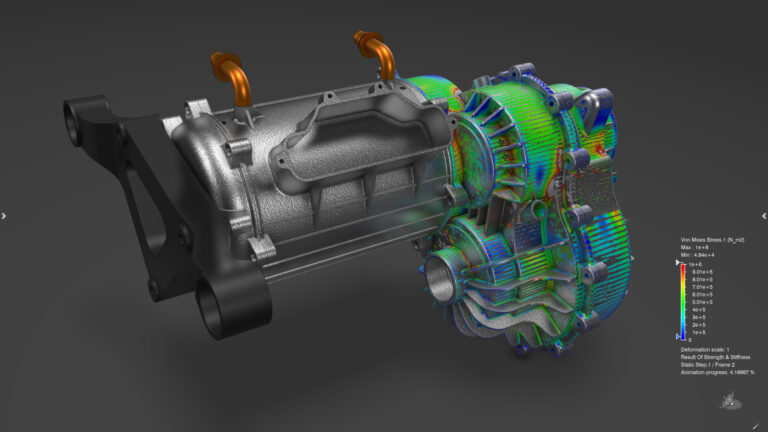
Engineers working with complex structural problems depend on technology that delivers reliable results and efficient workflows. Our structural simulation capability continues to evolve to address advanced engineering challenges. The latest R2026x release delivers key updates across the 3DEXPERIENCE platform and Abaqus Unified FEA applications, further improving user experience and analytical accuracy.
Supporting Structural Analysis with Advanced Tools
Simulation demands accuracy and computational efficiency. Balancing detailed models with reasonable analysis time is a constant challenge.
This release introduces features that automate repetitive, time-consuming tasks, enabling you to focus on applying your engineering knowledge to data interpretation and performance improvements. The 3DEXPERIENCE platform brings these capabilities together with a cohesive, unified user experience. When you update your geometry, downstream simulations are automatically updated, supporting robust design to analysis workflows.
R2026x introduces further improvements in geometry handling and meshing.
Geometry Idealization Updates
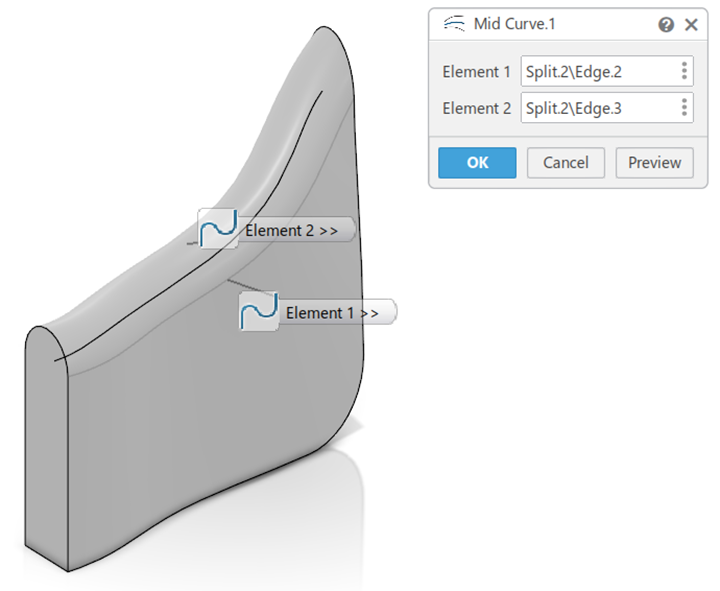
Simplifying geometry for simulation is critical. With R2026x, you can now extract a middle wire between two wires, adding efficiency with the mid-surfacing workflow of complex 3D structures.
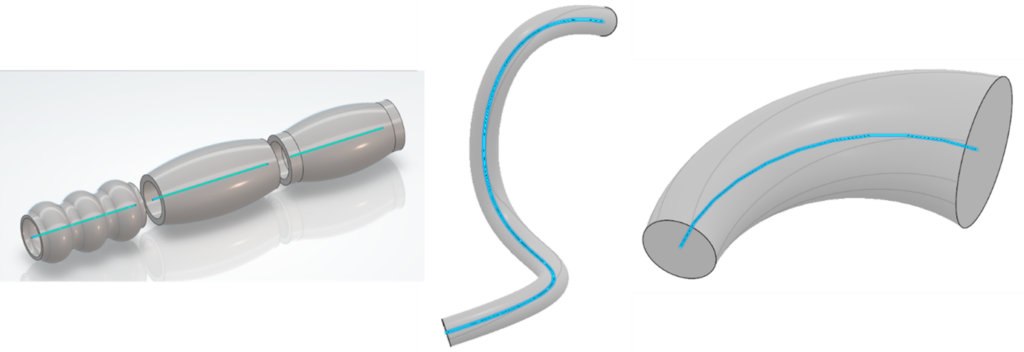
Another enhancement enables the extraction of the neutral fiber from circular rods or pipes, storing the minimum, maximum and average radii for each edge along the fiber. This lays the groundwork for precise geometry to simulation beam section definition in future releases.
With the trim with pieces function, a new partial extrapolation mode provides granularity in how geometry extensions are handled, improving model fidelity and enhancing downstream meshing activities.
Next-Generation Meshing
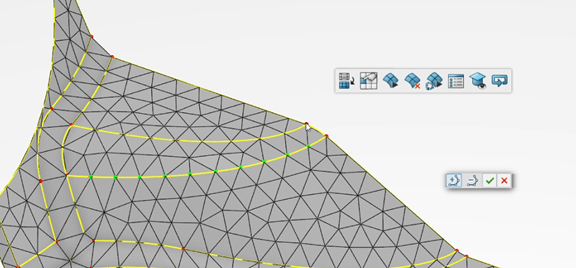
Mesh quality heavily influences both computational demands and result fidelity. Interactive mesh edge seeding now offers faster adjustments you can fine-tune mesh density without waiting for updates or slow interface refresh rates.
Solid Meshing Updates
The updated Tet-filler tool, with enhancements in domain recognition and group creation, enables the optional filling of internal cavities and a more customizable selection for subsequent property assignments.
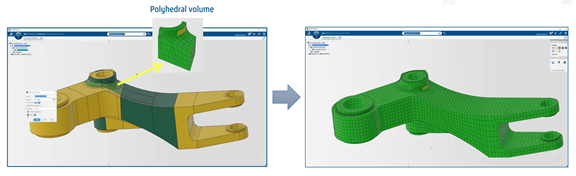
The partition hex meshing capability has been extended to support generalized polyhedral volumes, so you can easily apply hex meshes to geometric solids that previously warranted a tetrahedral approach. This development improves mesh consistency and increases the accuracy of results where stress concentrations matter.
Enhancements in Quad-Dominant Meshing
A new algorithmic approach in the quad-dominant mesher automatically reduces mesh irregularities, improving on both quality and flow. In cases where manual mesh manipulation is required, mesh editing commands have been enhanced to create persistent local mesh refinement, preventing edits from being overwritten by subsequent geometry adjustments and saving hours of rework.
Finite Element Modeling and Composites
Group Modeling
You can now create spatial element groups directly from solid bodies, extracting all relevant mesh elements or from extracted 3D mesh domains (is it possible to link “mesh domains” to the “Solid Meshing Updates” above?). This simplifies the management, and strengthens the customization of complex models. Additionally, enhancements for surface-based groups, enable users to control direction with easy switching and alignment functionality, further reducing errors and improving workflows involving shell elements.
Braided Composite Modeling
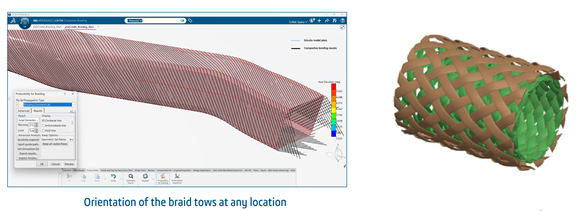
Composite shell section creation has been enhanced to support composite braided parts. It is now possible to account for variations introduced through the manufacturing processes when those braiding processes are performed on the 3DEXPERIENCE platform, essential for accurate simulation of parts manufactured through this specific composite manufacturing technique.
This new enhancement extends our composite simulation capabilities, resulting in more predictive simulations.
Model Review and Quality Analysis
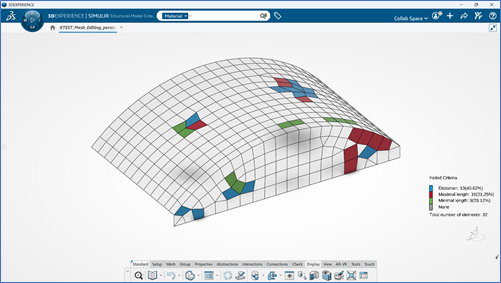
Right First Time is essential for speeding up project timelines and reducing costs. The updated review tools now highlight connected tria elements in quad dominant meshes, helping analysts spot poor quality areas within their mesh or areas where improvements could be made by eliminating trias. Quality analysis tools introduce new contour plotting options for selected mesh criteria within the review tools and pinpoints failing elements, highlighting the most critical quality issues.
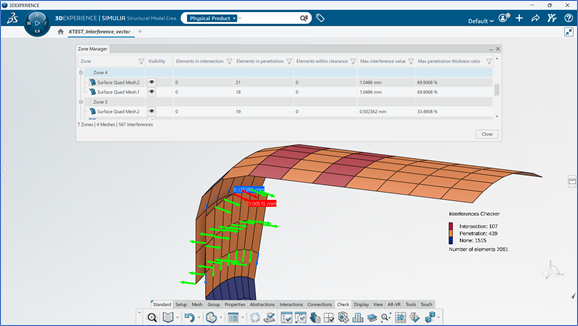
Visualization of penetration vectors, supported by statistical information, further enhances digital de-penetration workflows, allowing you to resolve geometric conflicts before they affect solver convergence.
Interactions and Connections
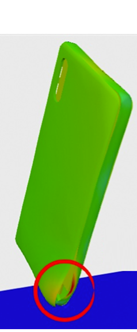
Contact definition is more efficient than ever. Model based contact lets you configure contact properties, initialization and handling at the model level, these definitions are now reusable across multiple simulations, eliminating recreation for each scenario. R2026x also incorporates support for Butler-Volmer Kinetics properties for lithium battery behavior workflows, as well as support for Eulerian materials as supports enabling Coupled Eulerian-Lagrangian (CEL) applications.
Contact Refinement and Fastener Updates
Following the model-based contact definitions, a new feature streamlines contact refinement directly in the scenario apps, enabling suspension, resumption or adjustment of the model-based contact definitions. While both model-based and scenario-based contact approaches will coexist, ensuring smooth transitions, it is recommended that users adopt model-based general contact. Fastener detection within the automated FEM method gets a significant boost with exact and maximum layer specifications, as well as enabling geometric surface detection for surface fasteners, streamlining model setup and aligning functionality with the standalone tools. Constraints based on element surfaces are now available for couplings and connections, including springs anchored to shell edges, with best practices in mind and a tighter solver integration.
Build Your Expertise Further
Expert Jamie Wheat leads an in-depth webinar about these new features. Jamie’s experience in structural workflow development for the transportation and mobility industry, including work for a premier Formula 1 team, ensures this session is technical and directly applicable.
The session covers solver enhancements and platform refinements in detail, emphasizing practical applications for analysts seeking higher efficiency and model confidence. Don’t miss this opportunity to see the R2026x features in action and learn practical techniques for advanced simulation efficiency.

Interested in the latest in simulation? Looking for advice and best practices? Want to discuss simulation with fellow users and Dassault Systèmes experts? The SIMULIA Community is the place to find the latest resources for SIMULIA software and to collaborate with other users. The key that unlocks the door of innovative thinking and knowledge building, the SIMULIA Community provides you with the tools you need to expand your knowledge, whenever and wherever.

Jamie Wheat is an Industry Process Expert in SIMULIA. Jamie’s experience in structural workflow development for the transportation and mobility industry, including work for a premier Formula 1 team.