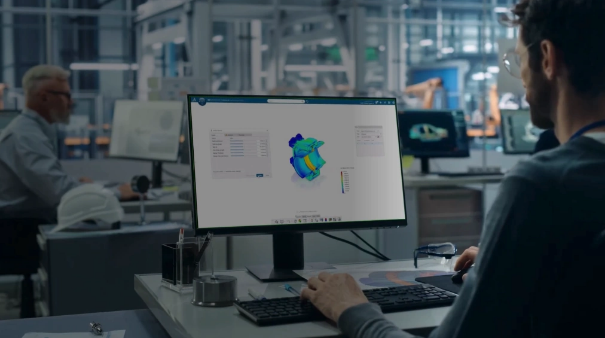
The Evolution of Simulation Workflows
What if understanding a simulation no longer depended on sifting through layers of models and results, but on simply asking the right question?
Virtual Companions and Generative Experiences introduce new ways to interact with simulation and engineering knowledge on the 3DEXPERIENCE platform. Together with the latest simulation technologies introduced in 3DEXPERIENCE SIMULIA R2026x FD03, they reflect the continued evolution of engineering workflows.
In the sections that follow, we explore both the platform capabilities that extend how engineers work with simulation and the latest R2026x FD03 innovations across the SIMULIA portfolio.
Virtual Companions Support Simulation Workflows
Simulation workflows often require users to configure analyses, validate models, manage simulation data, and interpret results across increasingly complex products.
Virtual Companions are the AI-powered virtual workforce of the 3DEXPERIENCE platform. Each Virtual Companion has a specific mission, accomplished through Competencies, and a distinct personality.
Competencies represent the ability, to perform a particular job or purpose. A Competency covers an entire domain of expertise, relying on more granular skills.
For simulation workflows, LEO assists users by helping them explore project information, validate simulation scenarios, visualize models, and examine simulation results through natural language prompts. By combining enterprise knowledge with engineering context, Virtual Companions simplify access to relevant information while reducing the effort required to perform routine tasks.
LEO Brings Natural Language Interaction to Simulation

Among the three Virtual Companions currently available on the 3DEXPERIENCE platform, LEO is the engineer, designed to support engineering activities through natural language interaction. For SIMULIA users, LEO helps set up simulations using your company’s best practices and knowledge.
LEO supports simulation workflows by helping users:
- Generate design performance insights and physics KPIs through natural-language interaction.
- Set up, run and analyze simulation results with confidence, regardless of prior simulation experience.
- Summarize project objectives, model components and simulation-specific data on request.
- Control visualization with a simple prompt—no manual menu navigation.
- Explore and process results automatically with a single typed request.
- Automate simulation setup and analysis for real industry test cases, saving considerable time.
Explore LEO and the Virtual Companion Competencies to learn more about Design Performance Analysis and AI-assisted simulation workflows.
Generative Experiences Extend Physics-Based Engineering
Alongside Virtual Companions, SIMULIA Generative Experiences combine validated, world-class physics solvers with AI – seamlessly embedded within enterprise design environments, not bolted on as a separate tool. They support the creation and enrichment of Virtual Twins while helping automate industrial processes and improve operational efficiency.
Trained on validated physics together with real and synthetic data, these capabilities enable organizations to reuse engineering knowledge, explore broader design spaces, and integrate AI into simulation workflows while maintaining simulation-grade fidelity.
For a comprehensive overview of the available Virtual Companion Competencies, Generative Experiences, and engineering scenarios, explore the What’s New | Generative Experiences & Virtual Companions page.
What’s New in 3DEXPERIENCE SIMULIA R2026x
The 3DEXPERIENCE SIMULIA R2026x release continues to expand simulation capabilities across the portfolio, helping engineers accelerate performance evaluation and make informed engineering decisions.
The following highlights showcase selected R2026x FD03 innovations across the SIMULIA portfolio, demonstrating how the latest capabilities strengthen engineering workflows across multiple simulation disciplines.
The article also explores Virtual Companions and Generative Experiences, AI-driven capabilities on the 3DEXPERIENCE platform that complement engineering workflows through natural language interaction, enterprise knowledge, and validated physics.
For a complete overview of the latest enhancements across the SIMULIA portfolio, explore the What’s New in the 3DEXPERIENCE SIMULIA Latest Release page.
What’s New in SIMULIA Roles in R2026x FD03
R2026x FD03 introduces new roles that help organizations expand simulation adoption, improve engineering productivity, and accelerate simulation-driven engineering.
Virtual Twin Physics Behavior Creator helps accelerate innovation by enabling users to train Virtual Twin Behavior Models with machine learning based on high-fidelity physics data, delivering trustworthy, simulation-driven predictions at scale.
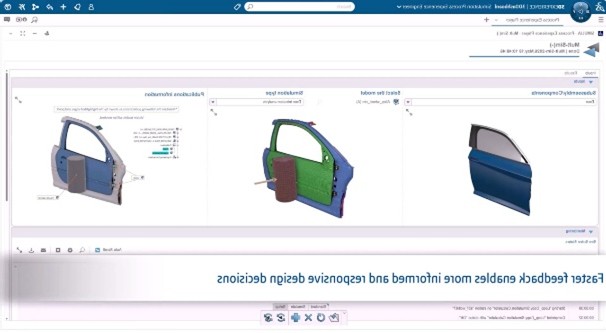
The new Simulation Process Experience Engineer role improves engineering productivity and expands simulation adoption by enabling users to execute approved engineering methodologies through intuitive, guided experiences that ensure consistency and reduce complexity. By providing approved engineering methods through reusable templates, the role represents a further step toward the democratization of simulation.
What’s New in Structures in 3DEXPERIENCE SIMULIA R2026x FD03?
R2026x FD03 introduces user experience and functionality enhancements for the Structural Engineer (SLL), Durability and Mechanics Engineer (FGM), Structural Analysis Engineer (SYE), and Structural Performance Engineer (SFO) roles, improving structural simulation setup, analysis, and post-processing.
User Experience Enhancements
For SLL, FGM, SYE, and SFO, the release enables Unconstrained Mode Detection by default for faster analysis troubleshooting, supports interactive monitoring, querying, and creation of simulation results during solution progress, improves load set and load case creation, and adds hotspot annotations for local minimum and maximum detection. SLL and FGM users can also name and comment results and resume incomplete multistep analyses from any saved increment or step.
Functionality Enhancements
For SLL, FGM, SYE, and SFO, R2026x FD03 introduces Advanced Lanczos and Subspace iteration solvers for reliable frequency response analysis. SLL and FGM users also benefit from GPU compute technology, encrypted material file support, composite solid element results visualization, and relative stress gradient correction for more accurate fatigue life predictions.
What’s New in Fluids in 3DEXPERIENCE SIMULIA R2026x FD03?
R2026x FD03 introduces user experience and functionality enhancements for the Fluid Dynamics Engineer, All Physics Analyst – PowerFLOW PowerBY, and Plastic Injection Engineer roles, streamlining simulation setup, improving post-processing, and expanding compute and meshing capabilities.
User Experience Enhancements
For the Fluid Dynamics Engineer role, the release streamlines Simulation Volume and Physics Domain setup, simplifies scenario creation, and improves post-processing with faster variable filtering and quicker access to force, moment, skin friction, and fluid traction metrics. The All Physics Analyst – PowerFLOW PowerBY role also benefits from improved upload performance in the Simulation Manager Content tab for faster file uploads.
Functionality Enhancements
For the Fluid Dynamics Engineer role, multiphase flow seeding enables users to start from a previous simulation to reduce runtime for transient multiphase analyses. For the Plastic Injection Engineer role, the release introduces additional compute capacity, allowing simulations to run on 8 to 32 CPU cores per job using tokens and credits while supporting multiple simulations in parallel. Local CVM mesh controls also enable targeted refinement of faces, edges, and vertices for improved accuracy in critical regions.
What’s New in Motion in 3DEXPERIENCE SIMULIA R2026x FD03?
R2026x FD03 introduces user experience and functionality enhancements for the 3D Motion Creator, Motion Engineer, Motion Analyst, and Suspension Analyst roles, simplifying motion model setup while improving visualization, collaboration, and result interpretation.
User Experience Enhancements
For the 3D Motion Creator, Motion Engineer, Motion Analyst, and Suspension Analyst roles, the release enables users to select Sub-mechanisms from deeper levels in the Product Structure hierarchy, simplifying the setup of complex motion models. For the Motion Engineer, Motion Analyst, and Suspension Analyst roles, improved glyphs and axis labels make Motion Markers easier to identify and select in 3D.
Functionality Enhancements
For the Motion Engineer, Motion Analyst, and Suspension Analyst roles, the release enables users to save critical assembly positions as DMU slides to share motion results with designers, use the 3DEXPERIENCE Compass Play button to quickly review Motion model content and behavior, and inspect geometric relations between two vectors using Motion Probe to better understand 3D Motion model state and results. For the Motion Analyst role, flexible body stress and strain visualization enables stress and strain data from dynamic loads to be viewed directly within the Motion App animation.
What’s New in Automation in 3DEXPERIENCE SIMULIA R2026x FD03?
R2026x FD03 introduces user experience and functionality enhancements for the Simulation Process Experience Engineer (PXS) and Simulation Process Engineer roles, helping streamline simulation process execution, improve process automation, and enhance simulation data management.
User Experience Enhancements
For the Simulation Process Experience Engineer (PXS) role, the release enables users to run and monitor trusted automated simulation workflows to improve engineering productivity and expand simulation adoption. For the Simulation Process Engineer role, enhancements include exporting XY history data for greater post-processing capability, simplified Python adapter configuration with the ability to create a document directly, ready-to-run activity status for democratized MODSIM scenarios, protected read-only references, and improved visibility of array parameters within the monitoring tab.
Functionality Enhancements
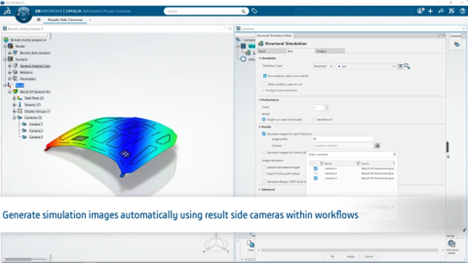
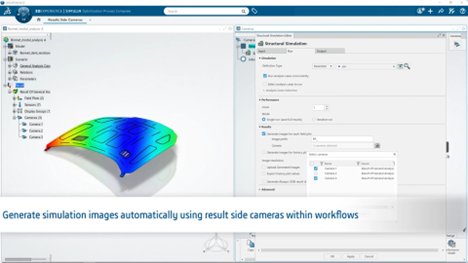
For the Simulation Process Engineer role, R2026x FD03 introduces resizable array handling for greater control of array parameter population, traceable process reuse to reuse standard processes with full traceability of inputs, outputs, and related artifacts, and automated image access to retrieve simulation result images through automated processes.
What’s New in Simulation Workflows in 3DEXPERIENCE SIMULIA R2026x FD03?
R2026x FD03 introduces user experience and functionality enhancements that improve simulation object management, results exploration, and simulation content visualization across the 3DEXPERIENCE platform.
User Experience Enhancements
The release enhances Isolation and Synchronization by enabling users to branch simulation objects, including Physical Products, using the broad renaming capabilities of the standard Advanced Branch command. It also expands Results Exploration by allowing users to monitor, query, and create simulation results interactively during solution progress across local and cloud simulations, detect local minimum and maximum values to identify peaks or valleys, and visualize composite solid element results to assess composite structural performance for All Structures roles and the Physics Results Explorer role.
Functionality Enhancements
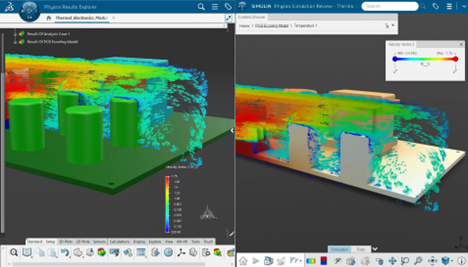
R2026x FD03 improves Experience Content Visualization with enhanced vector plot representations and controlled symbol density, providing improved clarity and greater consistency between the Physics Results Explorer and SIMULIA Physics Simulation Review roles.
Conclusion
From new roles and discipline-specific enhancements in R2026x FD03 to AI-driven capabilities such as Virtual Companions and Generative Experiences, the 3DEXPERIENCE platform continues to evolve the way engineers develop, evaluate, and improve products. Together, these innovations help simplify engineering workflows, improve access to simulation knowledge, and support more informed engineering decisions across the product development process.
Explore all SIMULIA Roles, here.
Read More
- Read more on the CATIA blog.

Interested in the latest in simulation? Looking for advice and best practices? Want to discuss simulation with fellow users and Dassault Systèmes experts? The SIMULIA Community is the place to find the latest resources for SIMULIA software and to collaborate with other users. The key that unlocks the door of innovative thinking and knowledge building, the SIMULIA Community provides you with the tools you need to expand your knowledge, whenever and wherever.

Ritu Singh is a mechanical engineer from Auburn University, Alabama, with six years of experience. She excelled as a senior design engineer for three years before transitioning to a writer and team lead for three years, specializing in creating accessible content. Currently, Ritu serves as an Advocacy Offer Marketing Specialist in Global Marketing at Dassault Systèmes for the SIMULIA brand, where she combines her engineering acumen with her writing skills to craft compelling marketing content.