How DELMIA’s Portfolio Powers the Future of Robotics and Manufacturing
With an ever increasing use of robots, even in factories that are dominated by CNC machines, it is time to take a closer look at the DELMIA portfolio and discover which applications are capable of programming robots and how they differ. Obviously, DELMIA Robotics is first on that list, and allows to program robots for traditional applications like pick & place, welding, painting and assembly tasks. A bit more surprisingly might be that DELMIA Machining is also on that list. It is not an alternative to DELMIA Robotics for the aforementioned applications, it is rather an addition that opens up new possibilities. DELMIA Robotics does not offer the same advanced capabilities to generate toolpath for machining applications as does DELMIA Machining.
Thanks to the technology transfer between the respective R&D teams, this gap has been closed by enabling DELMIA Machining to not only program CNC machines but robots as well. Last but not least on that list is DELMIA Virtual Commissioning. It allows to connect DELMIA to virtual robot controllers which enables users to simulate the exact robot behavior enabling them to debug & optimize their programs before they hit the shopfloor.
How to Increase Productivity while Maintaining Flexibility
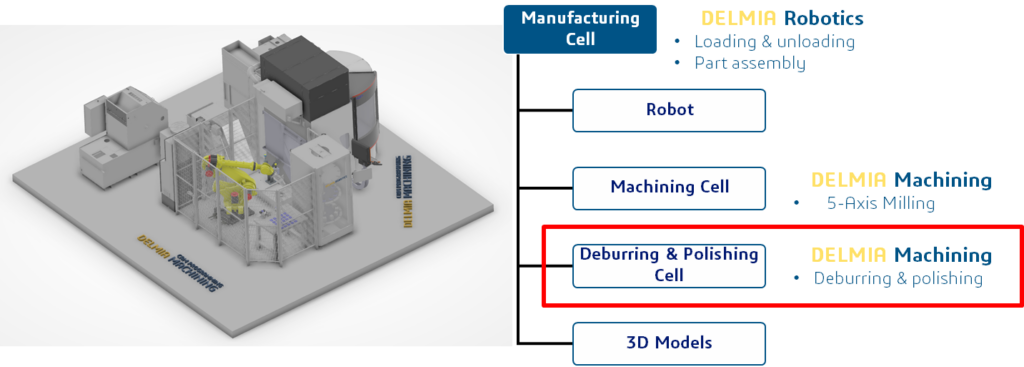
In 2025, during the Innoteq trade show, Dassault Systèmes demonstrated how all three applications combined allow you to implement a fully automated manufacturing cell that increases productivity while maintaining flexibility. This cell is consisted of a GF 5-Axis Machining center, a Fanuc robot, a part storage, an assembly station and two spindles for deburring & polishing. In this scenario, all three of the applications mentioned above were used to plan, simulate & implement this automated manufacturing cell. DELMIA Robotics was already used in the planning stage to verify that the layout ensured all the stations were in reach of the robot. It was also used to program the assembly and pick & place operations. DELMIA Machining was used for the applications that relied on high quality machining trajectories which in this context meant the deburring and polishing operations. Thanks to DELMIA Virtual Commissioning it was possible to debug, optimize and validate the robot programs before they were run on the actual robot.
Mastering Robot Machining: Fixed Tool Center Point Simplified
DELMIA Machining offers CAM-Programmers the possibility to use robots as well as CNC machines for machining processes without having to adapt to a different software. However, there are differences in the way robots and CNC machines are operated and this is reflected in DELMIA Machining as well.
This blog provides a tutorial that explores how to program a robot with a Fanuc controller in a fixed Tool Center Point (TCP)–a specific, stationary point in the robot’s workcell that the tool tip is programmed to return to or interact with–using DELMIA Machining. Learn how DELMIA bridges the gap between CNC machines and robots, offering CAM programmers a familiar yet powerful tool to expand their machining capabilities.
Scenario Introduction
This scenario was originally conceived for the Innoteq trade show 2025. Switzerland’s premier trade fair for the manufacturing industry. It combines DELMIA Machining, Robotics and Virtual Commissioning to implement a fully automated production cell. The scope of this tutorial is limited to the Deburring & Polishing operations.
Workflow
Information
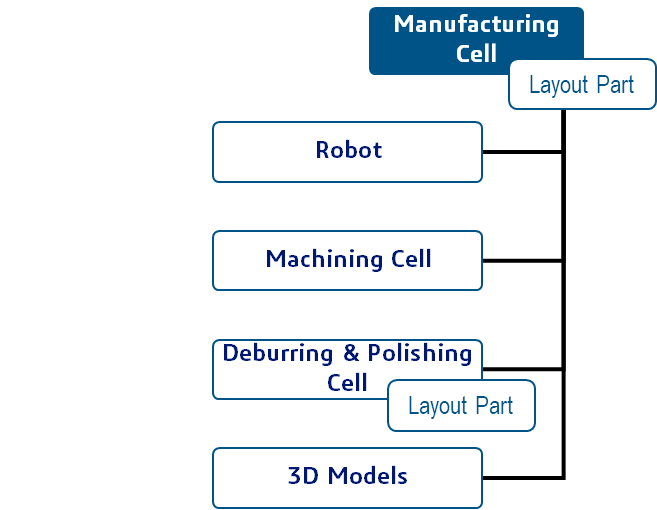
The complete project/scenario is contained in one ”Manufacturing Cell“ (top node), that contains two additional ”Manufacturing Cells“ that function independently. This setup allows to split the work on the three ”Manufacturing Cells“ between different people, accelerating the process.
To make sure the positioning of the different objects within the cells is consistent, a common part (Layout Part) is shared between the cells. This part contains coordinate systems defining the positions of all objects present in the cells. It is first defined when planning the layout of the entire cell (top node) and is then reused when building the cell for Deburring & Polishing.
Setting up the Manufacturing Cell Layout
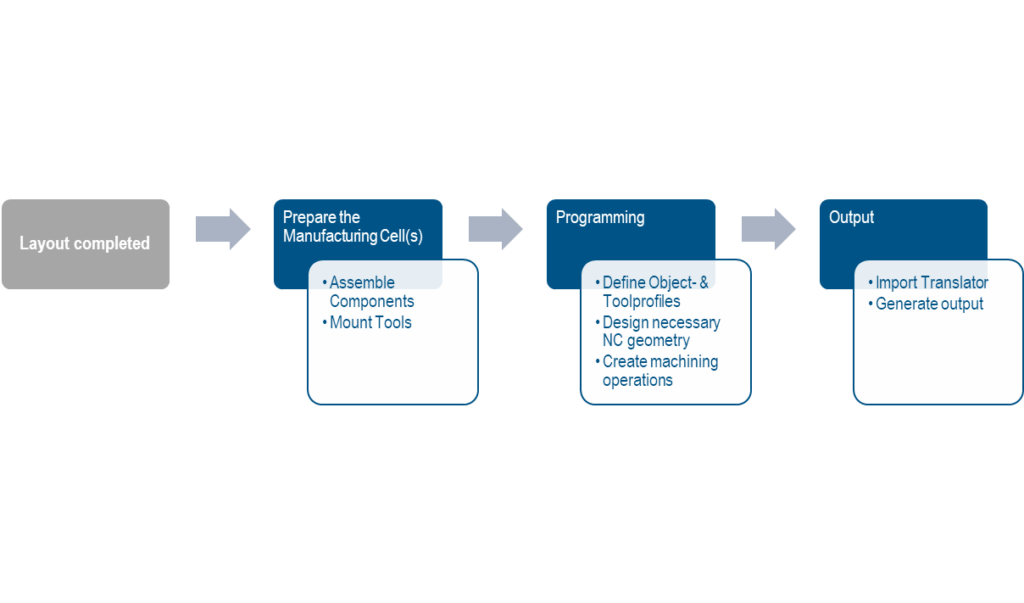
With the help of the ”Layout Part“, the relevant components can be placed in the same position as in the ”Main Cell“.
For this scenario, it was the spindles for deburring & polishing and the machine bed for collision checking. This is necessary since the spindles are positioned close to the machine.
Defining Fixed Tools for Stationary Spindles
The tools are mounted on the spindles that were added in the previous step. Since the spindles are stationary the tools have to be defined as fixed. The tool representations were already added in the previous step. This is only to make sure the tools are always visible, since no tool change takes place during the process.
Configuring Machining Axis Systems for Robots
The ”Machining Axis Systems“ which define the object profiles have to be positioned at the absolute origin of the manufacturing cell. The object profiles are automatically created, based on the machining axis systems, when generating the output.
Limiting Machining Operations with Surface Masking
The central section of the spoiler is the area where the helmet is attached to the stock. In order to limit the machining operation to this area, an additional surface covering it is created.
Programming Robot Machine Instructions and PP Comments
In addition to the machining operation (MO) there is also the need to create machine instructions. Those are necessary to make sure the robot movements happen in a predictable manner. This is achieved by controlling the start and end position of the robot movement. PP comments are used to turn the spindles on and off.
Generating Fanuc Controller Output for Fixed TCP
Set the controller type to robot controller and select the translator that corresponds to the controller on the robot. After generating the output, check the tool frame and the user frame in the output. For Fanuc controllers, they have to have the same index for fixed TCP applications.
Conclusion
The convergence of robotics and machining marks a pivotal moment in manufacturing, as demonstrated by the integration of DELMIA Robotics, Machining, and Virtual Commissioning. This synergy enables manufacturers to bridge the gap between CNC machines and robots, unlocking new levels of productivity and flexibility. By leveraging DELMIA Robotics for layout planning and assembly tasks, DELMIA Machining for precise toolpath generation, and DELMIA Virtual Commissioning for program validation, Dassault Systèmes showcased a fully automated manufacturing cell at the 2025 Innoteq trade show. This innovative approach not only streamlines operations but also empowers CAM programmers to seamlessly transition between CNC and robotic machining, paving the way for a future where automation and precision work seamlessly together.
Watch the webinar replay, Robot Programming in DELMIA Machining to learn more.
DELMIA, a Dassault Systèmes brand, transforms CNC machining, milling, turning and additive manufacturing. Through the 3DEXPERIENCE platform, our AI-powered machining solutions accelerate toolpath creation, enhance multi-axis optimization and prevent errors through full machine simulation. In additive manufacturing, DELMIA streamlines build preparation and material optimization. By connecting virtual simulation with real-world execution, DELMIA improves efficiency, reduces waste and empowers manufacturers to deliver high-quality, sustainable production with greater agility and confidence.

DELMIA Industry Process Expert Specialist